
Wednesday, March 11, 2026


Wednesday, December 03, 2025
Norwegian Fjord Horses in Popular Media (TV, Movies, etc.)

Movie - Frozen (2013)
Movie - Kon-Tiki (2012)
Movie - The 13th Warrior (1999)
Movie - The Greatest Showman (2017)
Movie - Little Women (2019)
Movie - Downsizing (2017)
TV - The Gilded Age
TV - Heartland (CBC) (S11E04) cast as "Attila the Mongolian horse" in the storyline
Stage - The Metropolitan Opera House’s “Aida.”
 |
| My late father driving his team of four Fjords. |
Wednesday, November 26, 2025
Google's Gemini 3 / Nano Banana Pro AI Image Creation
Just playing around with free online AI image creation tools. Six months to a year ago, they couldn't handle text requests very well, but now they're nailing it on the first try with no typos or errors.


Friday, September 05, 2025
VOIP Switch from 'Hamshack Hotline' to 'Hams Over IP'

At the end of August 2025, the longtime Amateur Radio VOIP phone system Hamshack Hotline was retired. Many hams, including myself, migrated to another platform called Hams Over IP. I enjoyed Hamshack Hotline a lot, so my hopes are that Hams Over IP is as good or better.

I completed the registration step yesterday, which only took a few hours to get my extension and password from the admins. Last night I tried following the provided instructions, but it was late and I was tired, so I didn't have success provisioning my Cisco SPA-514G compatible SIP handset.
This morning, with a fresh cup of tea and a clear head, it was less than 10 minutes, and I was online. Remember to never work tired or with a muddy head.
Being able to do all the configuration via the phone's built-in web server was so nice. Just a web browser on my PC was all I needed for the work.
 |
| My main shack HoIP phone (an SPA525G) with a custom background |
My Amateur Radio Mode ID's section of the blog has been updated to remove the Hamshack Hotline entry and replace it with Hams Over IP.
At the time of this post (2025-09-05), there are 8 amateurs in the Okanagan Valley with extensions on HOIP. Hoping this will grow as others migrate onto this service.
HOIP Service Test Phone NumbersAfter configuring your phone, you will no doubt want to test the connection and not have to bother anyone by calling them to see if it works ("Can you hear me now?").
Below is a list of extensions that you can call for various tests.
3191 - DTMF Test Calling this number it will say "DTMF Test" and then beep. Then dial a sequence of numbers and hit #. The system will read the numbers back to you, so you can confirm if you are sending DTMF correctly.
3192 - Talking Clock This will give you the date and time of the system.
3194 - Echo Test This will allow you test your latency between you and the server. In this mode, the system will echo back to you whatever you say as soon as you say it.
3195 - Milliwatt This will play a tone back to you till you hang up to test your received audio.
3196 - 3 Tone Slope This will play 3 tones back to you to you till you hang up to test your received audio.
3197 - Switch ID This will play a CW Sequence to you and then hang up.
3198 - Extension ID This will read back your extension number you are calling from.
Friday, January 27, 2023
HF 20m Dipole Antenna Project

Goal
Building a new monoband antenna which I'll orient in the opposite direction (east-to-west) to my other multi-band 80m Off Center Fed (OCF) Dipole that's installed in a north-to-south orientation on my property.
Height will once again be a challenge as I just don't have the trees or towers required to reach an optimal height for a 20m dipole of 42 feet. Instead, I'll have to live with 25 feet as that's the max height of the trees, ropes, and pulley's that I put up last year. The good news is trees grow, but I suspect I don't have the patience for them to reach 42 feet as part of their natural growth.
What happens when a dipole is installed lower than the spec, it's radiation pattern angles higher towards the sky, this affects the range of the antenna since the signal transmitted will point more upward than towards the horizon. But my other off-center fed dipole is also lower than I'd like and I get plenty of decent contacts from that antenna, so I'm ok with the compromise.
Ingredients
- Laundry line cable with clear plastic coating (salvaged from antenna project)
- Kenpro KA-50 1:1 balun (full specs below, also salvaged from another old antenna)
- 50' RG-8 coax cable with the UHF PL-259 connectors
- (2x) black plastic insulators
- (4x) wire cable clamps
- (2x) ring terminal connectors
- Silicone rubber weatherproofing tape
- Electrical tape
Specifications
Kenpro KA-50 (1:1 Balun) Freq Range : 1.8MHz-50MHz
Impedance: 50 ohm
Max power: 1kw CW - 2kw PEP (High Power Balun)
Ratio impedance: 1:1
The measurements below are for building a simple Dipole Antenna. The Wire Size can range from 16 AWG to 12 AWG. The larger the wire, the wider the bandwidth. The antenna is designed to be fed with 50 Ohm coax cable of almost any length with a Balun.
Place a 1:1 Balun on the antenna end of the Feedline. The Balun matches the Balanced Antenna into the Unbalanced Coax Cable. The balun will keep stray antenna currents off of the Feedline and help to keep stray RF out of the Radio Shack. If a Ferrite Balun is used, the balun needs to be rated at least twice the operating wattage to prevent the balun from overheating. This will help mitigate mismatches and stray RF due to using the antenna at frequencies other than what the antenna was specifically designed for.
Frequency: 14.175 MHz
Total Antenna Length ("L"): 33 Feet, 0.2 Inches
Element Length ("E"): 16 Feet, 6.1 Inches
Correct or incorrect I added 6 inches of extra cable at each end and marked the 16'1" measurements with a sharpie on the cable clear coating.
I soldered the ring terminal connectors to one end of each cable.
Then using 1 cable clamp for each cable I secured the cables to the KA-50 balun so the weight of the entire antenna and coax is not hanging from the ring terminals. As you can see in the photo below the clamps are close to the balun and an evened length loop connects to the screw terminals on the balun.

After that, I wrapped the area again with electrical tape to protect the silicon wrap and the coax connection even more.
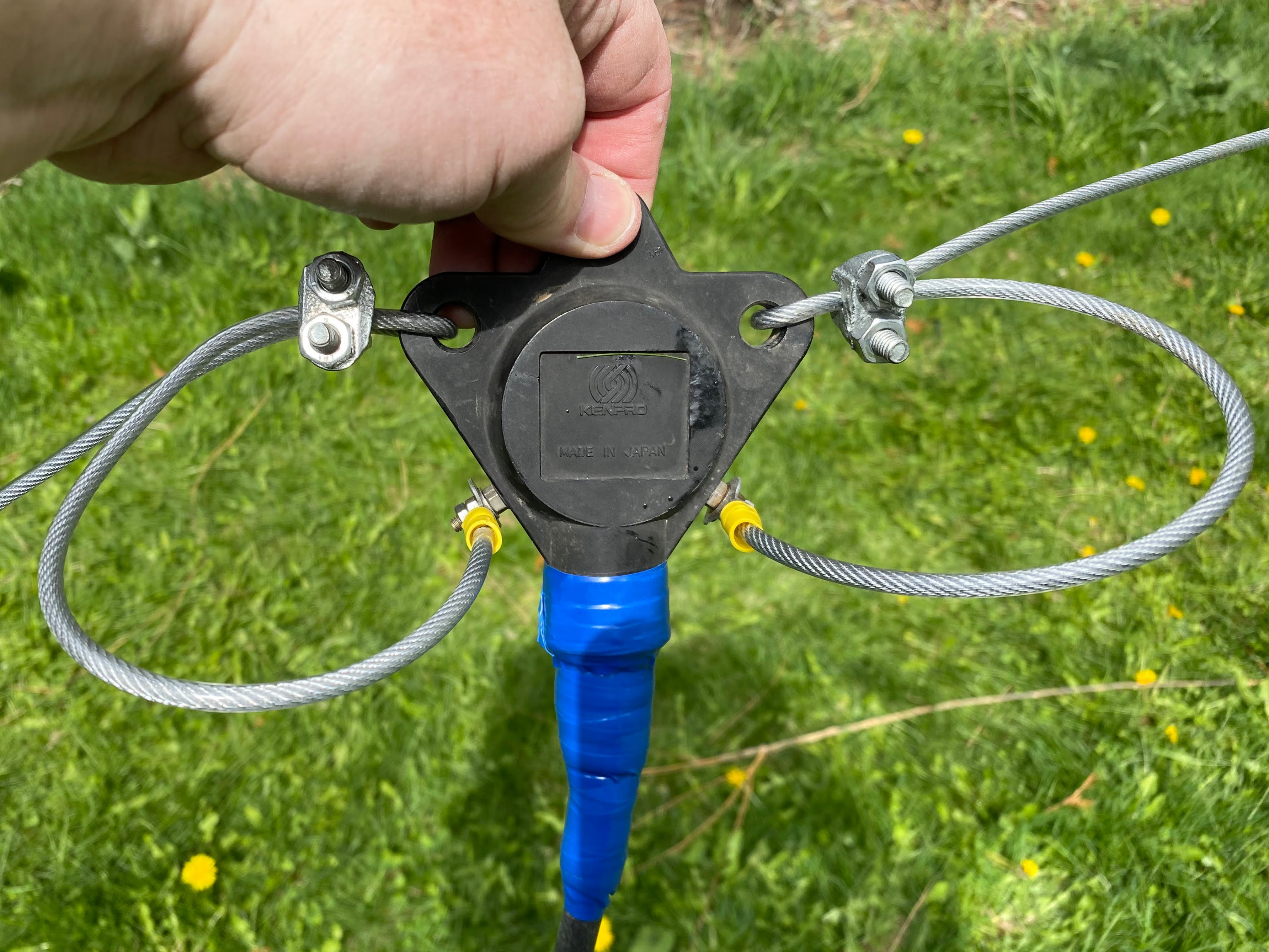
At the opposite ends of each cable, I looped the extra 6 inches of cable thru one end of the insulator and secured it with a cable clamp, like at the center balun. At the other end of the insulator, I attached the rope that will pull the antenna up into the air and hold it tight in a horizontal position.
So, at each end of the antenna, it's going from the cable, to the insulator, to the rope, to a pulley secured in the trees at opposite sides of my yard. I can now leave one end tied off in the tree, and the other end can be lowered to the ground for tuning.
Sunday, December 18, 2022
New Silver Star Weather RADAR Station
Canadian RADAR gets a big upgrade
Digital Writers - The Weather Network
Canadian Western Steel - Timelapse RADAR Tower Build
MMDVM Pi-Star Hotspot - Quick Replacement of the SD Card (Repair Notes)

In recent months the web server in my MMDVM Pi-Star hotspot has been failing during operation. The TX/RX from the hotspot continued to work, but any opportunity to interact with the device using the web server resulted in the pages not loading.
Yesterday I decided to entirely rebuild the unit's SD card using the following process. These notes are as much for me if I need to repeat the process again in the future.
Failure of SD cards is very common after continued use, especially in devices like this that run 24/7. The entire card might not fail, but sectors on the card can easily fail.
Steps
- Rebooted the hotspot and got access to the web interface temporarily.
- Took a current backup of my settings and downloaded/saved the file on my laptop.
- Note, this method requires Wi-Fi so a laptop or desktop with Wi-Fi capability is required.
- Slow formatted a replacement SD card to verify that all sectors are good.
- Downloaded the latest Pi-Star image from Pi-Star Downloads - pistar.uk
- Flashed the new image to the new SD card using the Raspberry Pi Imager app Raspberry Pi OS – Raspberry Pi
- Power down the MMDVM hotspot, full out the old SD card and replace with the new SD card
- Boot the MMDVM hotspot off the new SD card, leaving LOTS of time for initial boot steps to occur and the setup Wi-Fi access point to load (SSID = Pi-Star-Setup)
- Connect the laptop to the new temp SSID and load the start-up pages for Pi-Star
- Go straight to Configuration > Backup/Restore
- Load the backup file from step 2 and upload the file and Restore.
- Go back to Configuration and change the Wi-Fi settings to the stored settings from your home network (settings were stored in the backup and just need to be selected and applied.
- Reboot the MMDVM hotspot and everything should come up just like before the new card was installed.
High Bit Rate Error Tweaking
My particular MMDVM hotspot came with a sticker indicating the frequency offset preferences for TX and RX. In the case of my unit that was an adjustment of -475 for each.
When receiving from the Parrot Reflector I noticed that the bit rate error was as high as 4% and adjustment was required. I found a good instruction from someone and followed it to make quick work of the problem. Like tuning an antenna you make some broad adjustments, then when you find the range where it's working better you begin to dial in the better settings by making smaller changes in either direction.
These edits are made at Configuration > Expert > MMDVM
Here is a short summary of my adjustments and how they were working.
-475 = 4% BER (not good)
-575 (broad change of 100) = .5% BER (very good)
-675 (broad change of 100) = 1.2% BER (trending worse)
-625 (medium change of 50) = 1.1% BER (trending better)
-575 (medium change of 50) = .8% BER (very good)
-525 (medium change of 50) = 1% BER (trending worse)
You won't get identical readings on each transmission, but you can see that at -575 RX Offset I received the lower settings of .5% - .8%. After two readings below 1% BER, this was the setting that I left it on for RX. TX remained at -475 as per the manufacturers' sticker.
Monday, October 24, 2022
Monday, February 28, 2022
IARU Note On Radio Communications from Ukraine
https://www.iaru-r1.org/2022/note/
Feb 27, 2022 · HF · Tom, DF5JL

“Any radio amateur currently transmitting from Ukraine is risking his or her life. If you hear a Ukrainian station, do not broadcast its callsign, location or frequency — whether on the band, in a cluster or on social media. You may be putting lives at risk.”
Source: DARC HF Committee via facebook

Thursday, February 17, 2022
Annual RAC Renewal

Thank you! Your Radio Amateurs of Canada account has been updated.
Radio Amateurs of Canada
Thank You Aaren Jensen for renewing your RAC membership with the Radio Amateurs of Canada.
Your membership expires on: March 3, 2023
You can request a personalized membership wallet card at https://www.rac.ca/membership-card-request/.
If you wish to obtain email forwarding using your call_sign@rac.ca please contact the webmaster at https://www.rac.ca/webmaster/.
You can place online orders for RAC and ARES merchandise at https://www.cafepress.com/rac_radio.
In accordance with the new anti-spam laws please subscribe at https://www.rac.ca/rac-notifications/ to have your email address added to our mailing list.
If you have any trouble, please feel free to contact us.
Best Regards,
Radio Amateurs of Canada
Wednesday, January 19, 2022
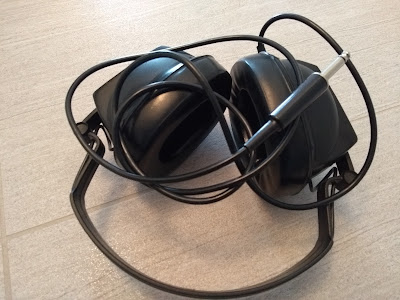
Drake UL68 Communications Headphones
Copied from https://www.universal-radio.com/used/sold688.html
UL68 Drake Headphones
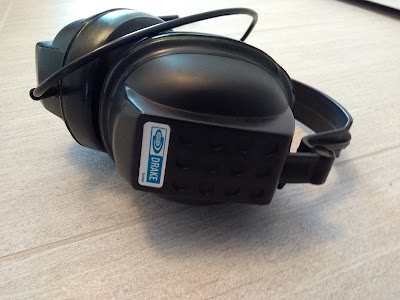
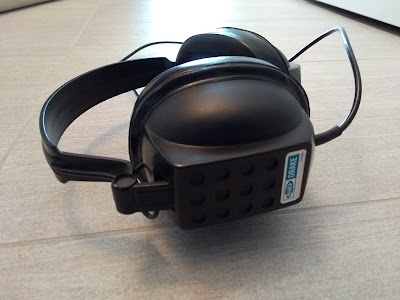
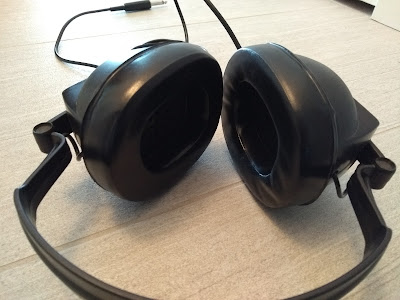
The Drake Headphones are monaural and terminate to a 1/4 inch phone plug. There is nothing particularly noteworthy about these headphones other than the Drake logo on the left earpiece and right earpiece. Not stellar headphones, but a rare find for the Drake collector. [06/14]
The Drake Headphones are monaural and terminate to a 1/4 inch phone plug. There is nothing particularly noteworthy about these headphones other than the Drake logo on the left earpiece and right earpiece. Not stellar headphones, but a rare find for the Drake collector. [06/14]
I really enjoyed this short description/review. I guess I'll need to test them out for myself.
If anyone has any more technical information on these that would be greatly appreciated. I collect headphones and headsets for various purposes including Audiophile, Gaming, and Radio Communications.
With a mono 1/4 inch phone plug these are squarely in the Communications category, with Drake being an old amateur radio brand still popular with collectors.
Took me some time on the web to even find an actual model number (UL68), and it didn't help that a popular modern Canadian recording artist (Drake) dominated the search results about what headphones he personally uses when in the studio recording. Also strange that Beats by Dr. Dre also dominated the Drake Headphone searches since Drake the artist never sponsored any Beats headphones that I'm aware of?
Anyhow, another set of 'cans' for the wall.
Monday, August 16, 2021
North Okanagan Wildfire Scanner Feeds
Are you interested in monitoring the BC Forest Fire Service in the North Okanagan area, feel free to use these streaming links which do not require any radio equipment or the sharing of special or private frequencies.
The use of streaming links assures that radio interference does not occur from the general public monitoring. When using actual radio equipment the operator could improperly transmit on these critical channels if the radio is improperly programmed or the user is improperly trained on its use.
Streaming links also offer excellent audio quality as the radio receivers being used are located where the signal is strong and clear.

Photo Credit: Contributed photo from Castanet.net
White Rock Lake fire photo taken from across the lake from
Canadian Lake View Estates in Vernon at about 11:15pm on Sunday
Web Browser Streams
Stream Title: North Okanagan Scanner
http://provoice.scanbc.com:8000/
Scroll down until you reach Mount Point /northok
Stream Description: BCEHS, Regional Fire Dept, BC Forest Service
Content Type: audio/mpeg
Stream Genre: Scanner
Social Media Stream URL: https://twitter.com/northokscanner
iOS and Android Apps
Browser your device app store for Police Scanner Radio & Fire
Download the free app. Listening for free can be done with the occasional interference for ads. You don't need to purchase the app subscription unless you wish to pay and go ad-free.
 |
| App appearance in the app store (iOS) |
 |
| App icon on your phone after installation (iOS) |
Once you have the app loaded and running search for North Okanagan RCMP Fire BCAS and SAR
You can mark the feed as a Favorite so it's easier and quicker to find it later.
Tuesday, July 06, 2021
Network Power Control for Remote HF Stations or Repeaters (Luxul PDU-02)


Controlling the AC power on equipment in a remote location can be very helpful. The scenario I think of is a repeater 'locking up' in the dead of winter, getting to the site is difficult. It will take time to get to the site. In the end, you only need to turn the equipment off and on again. A job that should only take a few minutes if you can do it remotely over the internet.
Whether it's your remote PC, HF transceiver, or a repeater, if you have networking and the internet, a PDU can be a very handy piece of equipment.
My local ham club has a custom programmed Raspberry Pi doing multiple functions in one of our repeater shacks. Remotely rebooting that Pi has already been seen as a valuable feature especially in the dead of winter.
Recently I picked up a number of the Luxul PDU-02's. A professional piece of network power equipment designed for purposes like networking, home theatre, automation scenarios. MSRP on the PDU-02 is approx $225 US.
The setup couldn't be simpler.
- Plug the provided 2ft. power cable into an AC power source. Any standard IEC PC power cord can be used if you need something longer.
- Plug the network into the ethernet port. Add the provided RF choke to the ethernet cable as close to the PDU as possible.
- Plugin the power cables for two devices (or a string of devices on power bars if you need more plugs).
- Get onto your network with a PC or laptop
- The PDU will pickup an IP address over DHCP. If the PDU 2 fails to find a DHCP server the unit will default to the IP address 192.168.0.6. You can use a network scanner to identify what IP it's using and plug that into your web browser to access the device's handy web interface.
Key features and specs.
- Individual IP outlet control of 2 outlets.
- 12 amp continuous load, 15 amp peaks.
- Easy setup and control
- IP “Autoping” and recovery for optimized system reliability
- MOV surge and spike protection
- Fast and easy configuration
- Automatic actions improve system reliability
- Automatic notification of connection status
- Control start-up or shut-down with remote sequencing
- Seamlessly interfaces with third-party control systems and cloud platforms for scheduling, control, reporting and customization
- 3-year limited warranty
- Connected equipment warranty
- Mounting kit included with a metal bracket for wall or flat surface mount.
- RF choke provided for ethernet cable
- Ground connector built-in.
- The unit shipped with the latest firmware 1.10.00
- Three account levels are built-in (admin, user, control system account).
- Accurate time from a network time source.
- Configure email alerts.

The web interface for the PDU has all the basic features and is very nicely laid out.


Subscribe to:
Posts (Atom)