Wednesday, October 15, 2014

D-Star Radios, Dongles, and a Homemade HotSpot

VA7AEJ's D-Star HotSpot operating on simplex UHF.
Built from a DVRPTR modem, BeagleBoneBlack micro PC, FreeStar on Debian Linux,
and an analog Kenwood radio with a 9600 baud data port.
I started to experiment with D-Star this past summer, it actually started with the purchase of a new truck. 

In the spring of this year I purchased a used truck to replace my old 88' Sierra crew-cab that ran like a tank, but looked like a shipwreck. After I received the newer truck (2001) I started to have grand plans about radios, antennas, and all the possibilities.

After my birthday in July I took my gift cash and started shopping for a new mobile radio, D-Star enabled radios seemed to be wise investment since I was getting a fully functional analog FM radio (single or dual band), plus it would also be D-Star DV enabled on the same bands. More modes / more versatility

Icom ID-880H Dual Band D-Star Radio

Evolution #1 - My First D-Star Radio

So after some shopping and stretching of the budget, I bought an Icom ID-880H. This is an analog FM dualband (VHF/UHF) radio that is also fully functional on D-Star's digital voice mode as well.

I had purchased another Icom mobile previously for my QTH base station (IC-2300H), and I really liked the brand and the radio. I also had purchased a programming cable and software package from RT Systems for the first radio. Coincidentally, the programming cable was compatible with the new radio, so all I needed was just the model specific software for the new radio and now I have PC programming capabilities for both plus I saved a bit of money.

Throughout the summer I installed and enjoyed the new radio, but I don't have a D-Star repeater in my immediate vicinity. So my only opportunities to try D-Star came when travelling in the truck over longer distances to repeaters in other cities.

Before I get any further I should mention the following to all D-Star newbies.
  1. D-Star is a digital mode for licensed Amateur Radio Operators. You can't use D-Star without a license.
  2. D-Star requires registration of your amateur radio callsign to work. All D-Star repeaters and reflectors are linked over the Internet so once you've registered on your nearest repeater, you're ready to talk worldwide soon afterwards.
  3. Registration can take as little as a few hours to process, or it can take days. I suggest that you research D-Star Registration as one of your earliest steps in deciding to try out D-Star, especially get it started before you buy a radio. 


Evolution #2 - An Even Cheaper Method Of Using D-Star

So even though I had caught the D-Star bug, I wasn't able to use it as often as I wanted. So with that in mind my second investment was in a DV Dongle from Internet Labs.

DVDongle - D-Star via USB on your PC
The DV Dongle is currently the entry point for D-Star. At $200 it's not even a radio, it's simply all the core electronics and digital decoder required to talk on D-Star over the Internet. 

Because the D-Star systems are connected worldwide via the internet, the DV Dongle and your home PC or laptop can also make a D-Star connection over the Internet without the need of a radio. The only downside is that you are tethered to the Internet as your connection point.

Using a DV Dongle works as follows.

  1. Register your callsign (one registration per callsign is all you'll ever need to do) before starting any D-Star activity
  2. Plug the DV Dongle into your PC via USB
  3. If required, add the appropriate driver software for your host operating system.
  4. Install the DV Tool software OR the DutchStar WinDV software. Really you should try them both to compare the features and user experience. I personally have both installed and still flip back and forth.
  5. Connect a microphone and headphones, or a headset with a mic into your PC. Please don't make others have to endure the echo nightmares of an open mic and speakers.
  6. Configure the software you have installed to use the correct com port of the dongle, your D-Star registered callsign, and the audio inputs and outputs to match your mic and headphones. These are the bare minimum things you'll need to configure, there is lots of other stuff to figure out later.
  7. Connect the software to the dongle
  8. Input a D-Star repeater or reflector and make a connection.
  9. Click your mouse on the PTT button and start your first QSO.
There are plenty of more detailed and better produce instructions and videos on this entire process online. Please Google them and work through it step by step.


Evolution #3 - My Own D-Star HotSpot

So far I can use the DV Dongle on D-Star while sitting at my home PC.

And I can connect to D-Star while driving in the truck as long as I'm near repeaters in other neighboring cities and provinces.

But what about around my hometown, that's where I would get the most use out of any D-Star radio. Working in the yard, the shop, driving around my QTH, etc. 

So while researching all the D-Star related gear and technology I kept hearing about HotSpot's, and that led me to the latest project.

To define a D-Star HotSpot, maybe I should start with a comparison... 

At home, you likely have wireless internet. The wireless service is delivered to all your devices (computers, phones and tablets) via a wireless router or access point. These devices provide a bridge between your wireless devices, and the high speed wired internet delivered to your home. The output power of your wireless access point or router is not very strong, but it's strong enough to provide wifi to the area around your home. You may have also heard the term "HotSpot" used by businesses or restaurants when referring to free wifi connections at that location.

So let's say you have a D-Star radio, and no local D-Star repeater. Or, maybe there is a local repeater, but it's busy, and you would like to control the linking and unlinking of the repeater at your whim, but that would upset the others using it.

A D-Star HotSpot, is essentially your own private micro/mini repeater. It operates at low power (10 mW to 5 W), and has a range from maybe 50 meters to 5 kilometers (depending on structures, terrain, line of sight, etc).

Internet Labs, the company that makes the DV Dongle has a second product called a DVAP Dongle. This is a 10 mW hotspot USB device available in VHF or UHF models. When connected to your home PC, and running the software, you can now move freely around the house talking on D-Star from a handheld. This is the lowest power version of a hotspot, but it works well if you don't have far to travel.

A more powerful and DIY solution to a Hotspot is one that you build yourself from the following ingredients.

  1. An analog VHF or UHF amateur radio with a 9600 baud data port built in. Commonly people are using mobile radios that offer this feature set.
  2. A GMSK modem. Popular models include DVRPTR, MoenComm Star*Board, and Dutch*Star DM-1
  3. A computer (big or small, more details to follow)
  4. Hotspot software like FreeStar from Canada, or DutchStar from the Netherlands.
  5. A suitable VHF or UHF antenna.
  6. A suitable 12v DC power supply.
In my case I went with a Kenwood TM-V7A dualband mobile radio that I purchased used a couple years ago. It had a 9600 baud data port and was sitting on a shelf just waiting for this project to come along. 

For a modem, I ordered a DVRPTR v1 from http://www.dvrptr.net/ This is an open source design assembled, tested and shipped worldwide from Montreal, Canada. $130

For a computer, I opted for a BeagleBoneBlack a low-cost, community-supported development platform for developers and hobbyists. Fitting inside of an Altoids tin, this tiny PC can boot Linux from a MicroSD card in under 10 seconds and is great for projects like this.

For software I went with the FreeStar software (another Canadian product) from VA3UV http://www.va3uv.com/freestar.htm. FREE STAR* is an experimental approach to the implementation of a vendor neutral, open source, digital communication network. Ramesh is a fantastic resource for support and an incredible evangelist for this product. I probably bounced 10 emails to him over the course of a week or two, and answered every one in a timely fashion with great advice. FreeStar can be configured to run as a full DV repeater, or a hotspot in either full duplex or simplex operation.

For an antenna, I already had a Comet dual band vertical on my tower and with a Comet triplexer I was able to connect the HotSpot to the UHF band of the antenna. The best part of this solution is that my VHF radio in the shack is also operating on the same antenna's VHF band thanks to the triplexer. 


So after a week of building, testing and enjoying, I now have a 5w hot spot operational out of my QTH. I think I'm the only 'ham' in town playing with D-Star or even UHF, so the band is very quiet in my immediate area. I'm also located at the bottom of a small mountain valley area, so there are large hills on all sides keeping my signal from spreading too far in any direction causing interference with others. In the direction of the highway I commute on, I'm getting about 5km of range with good clean DV audio, I have linked and unlinked reflectors from as far away as 10km, but the audio is loaded with 'R2DR' noise till I'm at least 7km from home. I attribute the great reception to the great antenna up 40 feet on the tower outside of my home. Earlier tests with another antenna about 15ft off the ground had about half the range at the same power level.

I made my first contact with the hot spot on a Friday evening Canada wide net on the XRF005B reflector in Ontario. This week I've had multiple QSO's while driving to and from work with British, Irish, and American amateur radio operators on the REF001C 'mega' reflector.

D-Star is yet another Amateur Radio technology that combines radio communication and computing in new and exciting ways. I'm really enjoying it.

Tuesday, February 04, 2014

RTL-SDR - The NooElec 'Ham It Up' Upconverter v1.2 and a 3D Printed Enclosure

The 125MHz upconverter for the RTL-SDR arrived last night in the mail.

Darn it! I'm missing an adpater to start using it right away. Once again I'm faced with the hardware arriving before the adapters and cables do.


The 'Ham It Up' Upconverter from NooElec version 1.2 will essentially add 125MHz to all the incoming signals allowing me to receive HF signals through the RTL-SDR. No longer limited to the lower range of 25MHz, I'll be able to scan all the HF bands from 160m to 10m.

The upconverter at $45 is more expensive then the sub-$20 RTL-SDR's but for a Ham Radio guy the HF bands are a key receiving range so it's worth the money. All said and done I'm still putting together a SDR Receiver kit for well under $100 that I can carry around in my pocket.


Since I couldn't use the upconverter right away due to my cabling issue, I used the time last night to surf around the internet and stumbled upon a shared 3D model for an enclosure designed exclusively for the Ham It Up. http://www.thingiverse.com/thing:150101/#files Thanks Tim Deagan - KC5QFG.

I brought the 3D model files into the office and during some spare time today we cranked off a copy on our MakerBot.


I'm really pleased with the outcome and I'm totally geeking out over the last few weeks, QRP Radios, SDR, Kits, 3D Printing, YIPEE! Once again it's time slow down and start USING instead of just BUILDING.

Thursday, January 30, 2014

The QRP Diaries #4 - AGC for the X1M


Anyone thinking of purchasing an X1M QRP radio needs to join the YahooGroup. This is by far the most active YahooGroup / email reflector that I've ever been a member of.

The group started in March of 2013, and less than 1 year later there are 750 members, and 500-700 messages per month of activity.

AGC for the X1M

Dale Parfitt , W4OP was an early adopter of the X1M radio and took it upon himself to remedy the radios lack of automatic gain control.  For the newbies, that is the radio feature that tries to balance the volume levels of different signals. In Amateur radio imagine two guys talking on the same frequency. One is operating at 100 watts and the other at 1000 watts. Your roughly in the middle and listening to both. This experience is like standing between two people talking to each other, one is whispering, and the other is yelling.

From Wikipedia...Automatic gain control (AGC) is a technique found in many electronic devices. The average or peak output signal level is used to adjust the gain to a suitable level, enabling the circuit to work satisfactorily with a greater range of input signal levels. For example, without AGC the sound emitted from an AM radio receiver would vary to an extreme extent from a weak to a strong signal; the AGC effectively reduces the volume if the signal is strong and raises it when it is weaker.

The AGC SMD kit for the X1M was originally created by Dale and was designed to be extremely small and fit inside of the X1M , Dale designed and sold the kit in it's first iteration, and then moved onto working on a crystal CW filter KIT, also intended to be an internal board upgrade for the X1M.

Charlie , W5COV then picked up the reigns of the AGC kit and starting in Dec of 2013 was taking orders for it online. For this $12 little kit he used the same boards and parts as what Dale included in his kit. You can check it out in the Photos and Files section of the YahooGroup for more information.

I personally ordered the AGC kit before my X1M had even landed on my door step. Conversations on the YahooGroup gave me enough of a warning that is was a 'must have' mod if you could do it.

Earlier this week a tiny little package arrived in the mail, at first I wasn't sure what it was. When I opened it up, I was a little surprised at the size. A tiny circuit board the size of a nickel, and some small components. At closer inspection most of these parts were the size of a sesame seed, they had some plastic packaging around them since they were cut right off a reel of SMD parts.

I work for an electronics manufacturer, we have our own SMT line so I'm familiar with the tiny parts that the pick and place robots pull off the reels and place on the boards. In our line we move the circuit boards through in this order.

  1. A screen printer puts the solder paste on the pads throughout the circuit board. All the tiny pads get solder, the rest of the board is left clean. When completed a conveyor moves the board to the next machine.
  2. The next SMT machine places all the small SMD parts on the pads. This machine has lots of reels of parts. The multiple hands, and fingers in the machine (those are my terms, not official SMT speak) can place about 100,000 parts per hour. When completed a conveyor moves the board to the next machine.
  3. The next pick and place machine has less reels, but specializes in larger parts. The type of products we build require some larger components, it's not all tiny SMD sized parts. When completed a conveyor moves the board to the next machine.
  4. The final machine is an oven. In our case it's a 4 zone convection oven. A 'recipe' is made for each type of product to bring it up to temperature, just enough to properly melt the solder paste and fix the SMD parts to the circuit board. But not too much to damage the parts large or small. When completed a conveyor moves the board to a quality control station.
  5. Our SMT staff check the board, inspect the parts, and in some cases use a special cutter to split larger circuit boards into the small ones we would fit into our products. It's more efficient to make larger boards that consist of many smaller ones, that way more product moves through the line with less adjustments to the equipment.


So why all that level of detail?

  1. I think it's pretty cool and not everybody get's to see how stuff is made.
  2. To put into perspective the size of the parts that came in this kit.


SMD sized Capacitor - The actual part is smaller than a grain of rice, more like the size of a sesame seed.

So when I opened the kit and saw the parts I must admit I panicked a little. I built my first thru hole electronics kit only one month ago and I thought that was a size of part at the edge of my eyesight and dexterity.

So for this kit I cheated.  I know my soldering skills are C+ or B at their best. But when you work for an electronics manufacturer and your best friend works on the hardware side of R&D, you can cheat and take it to Dave.

So after hours I gave it to Dave and in less than 15 minutes he scanned the diagram, put it under his microscope and soldered it all together, I was reading the instructions and skipping ahead just to keep up with him.

His comment when it was all done "I wish we still used these sized parts in our SMT line, they're so big and easy to work on".


Dave's Work - Nice job Dave!
So knowing that the rights tools make a big deal I brought the X1M into work and over the lunch hour snuck into the lab and installed it. I was feeling a bit guilty for using Dave and I figured with the right tools I should be able to complete the job myself. Four precise solders later I was done.

AGC Kit wired into the radio and tested. Fixed into place with double sided tape
Now I sitting back at home in the shack, tuning around on 80m and WOW what a difference, all the audio so far has been very balanced, a very nice improvement!

Thanks to Dale W4OP for the great design, 
and Charlie W5COV for keeping the kit alive.


Friday, January 17, 2014

RTL-SDR Adapters and Pigtail Cables

MCX to BNC pigtail cable (bottom) - BNC to UHF adapter (top)
Thanks to Ron VA7VW for providing this information for me and the other NORAC club members as we prepare our bulk order of some RTL-SDR's.

Ron is a 'VHF and Up' enthusiast so his expertise is appreciated. 

The RTL2382U / R820T USB DVB-T dongle is 24 MHz to 1.850 GHz

So let's look at some common Amateur Radio RF connectors


N type connector
  • 0 - 18 GHz
  • insertion loss is less than .15dB @ 10GHz

BNC type connector
  • 0 – 4 GHz
  • insertion loss is .2dB @ 3 GHz

UHF type connector
  • 0 - 300 MHz
  • insertion loss is 1 dB @ 300MHz
  • As you can see it's good for HF but not really suitable for a very very wide portion of the RTL-SDR’s frequency range 300 MHz - 1.85 GHz)

MCX to SMA is also a very common pigtail/adapter combination on these dongles with very acceptable low loss.

So with lots of cool activities on the full range of the RTL-SDR we need connectors and cables with suitable low loss characteristics.

As Ron says... At VHF and up, every dB counts. 

So with that in mind I suggest that we increase the variety of pigtail cables that we supply to NORAC members with the RTL-SDR.


As mentioned in the original quote we still provide the MCX to BNC pigtail with the BNC to UHF adapter (picture at top of this post).

But we should all ALSO consider some or all of the following.

MCX to N female

MCX to N male

MCX to SMA female


And since a couple of the NORAC members have already expressed interest in an Upconverter, you will absolutely require the pigtail below to connect the RTL-SDR to the NooElec Upconverter board.

MCX to SMA male - This is a required cable for a RTL-SDR to Upconverter connection.

The QRP Diaries #3 - The Unboxing and First Impressions

I love it... ha ha

This is a fun little radio and I can see so many possibilities.

When it first arrived I resisted the temptation to rip open the box and decided to film a quick unboxing. I know when I buy something online these days I appreciate and and all videos that exist about the product. for people like me they are helpful.


Wednesday, January 15, 2014

RTL2832U R820T SDR USB Dongle and SDR# (SDR Sharp) Installation

One of many the RTL2832U/R820T Digital TV USB dongles on the market

Over the last year + certain models of Digital TV (DVB-T) tuners in the form of a USB dongle have been gaining popularity with hobbyists when it was discovered that this tiny USB stick could be used as a Software Defined Radio receiver with a fairly wide range of frequency and use.

The RTL2382U Chip, this is the ADC and USB data pump. It is then mated with different models
of tuner chips.
  • E4000 Tuner - 60MHz to 1700MHz; retired
  • FC0012 Tuner - 50MHz to 1000MHz; retired
  • FC0013 Tuner - 50MHz to 1700MHz; retired
  • R820T Tuner - 24MHz to 1850MHz ; active

The current model is the RTL2832U/R820T, it has just replaced the E4000 which is still available online as well. The RTL2832U/R820T is comparable in performance, wider in receiving range, and less expensive overall.

The frequency range of the RTL2832U/R820T is roughly from 24MHz to 1860MHz.

So this includes 10m, 6m, 2m, 222-band, 440-band, 900-band, 1240-band, and much more. Even lower frequencies (all of ham radio HF) can be received with additional up converter boards available online.

Lots of choices are available.
http://blog.kf7lze.net/2012/09/14/round-up-of-rtlsdr-upconverter-choices/

Most of the USB SDR sticks/dongles include a cheap antenna and use a small MCX antenna jack so adapters are required to connect a better antenna of your choice. With a better external antenna (for example a Discone) the RTL2832U / R820T can be very impressive as a receiver. The basic antenna that it ships with can still be useful for travel or use in cities or areas where signals are already strong.

Once you've ordered and received your RTL2832U/R820T you need to get up and running. I'm going to summarize the steps for a Windows PC or Laptop. Of course there is also software for OSX and Linux, as well as a driver and app for Android.

RTL2832U/R820T Installation for Windows
  1. Visit the SDR# website (http://sdrsharp.com/) and download the installation Script. Click on Downloads button on the top menu, then scroll down the downloads page and look for the link to the quick installation script to test the latest development version. Download the ZIP file and then unpack it.
  2. Make sure your computer is connected to the Internet and then launch the Install.bat file that was included in the unpacked zip folder. This will execute the command to create a new folder and download everything you need for the latest version of SDR#.
  3. A new folder "sdrsharp" now exists in the location where the Install.bat folder was executed. I personally suggest you move the new sdrsharp folder from this location to a more permanent location on your system. The application is ready to run in this folder so you may not want it on your desktop or in your download folder long term. I moved mine to the root of the C: drive before going on to the next steps.
  4. Insert your RTL-SDR dongle into your USB port on your system. Allow windows to find and install a driver if it can. DO NOT install any of the Digital TV software that may have come with the dongle.
  5. When that's complete open the sdrsharp folder and execute the program zadig.exe. Go to the Options menu and select List All Devices. From the Devices drop down menu select the device named Bulk-In, Interface (Interface 0). Click on the button Install Driver, allow Windows to install an unsigned driver (if prompted). you'll be prompted that the driver install is complete and you can close Zadig.
  6. Browse inside the sdrsharp folder and launch the actual SDR software SDRSharp.exe, you may also want to create a shortcut to this program and place it in your Start menu or on your Desktop for more convenience.
  7. To get started in SDR# you need to complete the following basic setup steps.
  • From the top drop down menu (between the Play and Configure buttons) select the RTL-SDR / USB device.
  • Click on the Configure button  and make sure the Generic RTLxxx OEM is selected. Feel free to leave the sample rate and mode alone for now. Turn on the check box for RTL AGC and drag the slider to the middle. Then turn on the Tuner AGC and click the Close button.
  • Go the top left and click on the Play button and your receiving!

Next...


There is a great YouTube video from Clayton Smith (VE3IRR). His video he picks up where my directions end. He walks you thru a lot of the settings in SDR# showing you how they work and also showing example frequencies all over the range of the RTL-SDR so you can get a feel for things in a relatively short period of time. His video is about 17 minutes long.


Getting started with SDR# and an RTL SDR Tuner

Sunday, January 12, 2014

The QRP Diaries #2 - The X1M Platinum - Specs


X1M Pro - The New Platinum Edition
  • Improved Display
  • Improved Controls
  • Improved Components
  • Improved Filtering
  • Improved Performance
  • NOT A KIT - FULLY WIRED & TESTED
Frequency range RX & TX:  100 kHz ~ 30 MHz*
Modes: USB & LSB & CW
Power output: 5 Watts (4.5 Watts)
Operating voltage: 12 vdc
Operating current: 0.35 ~ 1.2 amp
Receiver Preamplifier:  Yes
Memory Channels:  100
RIT Function:  Yes
Automatic Internal CW Keyer:  Yes
Backlight On/Off:  Yes
Keyboard  lock:  Yes
Dimensions:   3-13/16 x 1-9/16 x 6-1/8 inches
Weight:   0.65 kg  ~  1.43 lbs
PTT Microphone:  Included
Computer Control:  Compatible with Ham Radio Deluxe (factory adapter required - Choose Icom IC-718 in HRD)

* Transmits continuous 100 kHz - 30 MHz via  Menu option.  Preset transmit range is the five US bands shown below.

Five Ham Bands are configured with bandpass filtering.  Transmitting on frequencies outside these ranges will require external bandpass filtering.

  • Band 1:    75/80m - 3.5 ~ 4.0 MHz
  • Band 2:    40m - 7.0 ~ 7.3 MHz
  • Band 3:   20m - 14.0 ~ 14.350 MHz
  • Band 4:   15m - 21.0 ~ 21.45 MHz
  • Band 5:   10m - 28.0 ~ 29.7  MHz

Receiving sensitivity: better than 0.45uV,

Frequency stability: better than 0.5ppm

Frequency accuracy: better than 0.5ppm

Operating voltage: 12.0 ~ 14.0V DC

Receiver Standby Current: 0.5A
 

Included in the package:
  • X1M Platinum Transceiver
  • Power plug (owner must build their own cable)
  • Keyer plug (owner must build their own cable) 
Available options:
  • Audio Filter for CW or SSB - Variable Center Frequency and Bandwidth
  • Computer Interface Connector Cable (TTL/RS232 to USB) - To Update Firmware & Operate X1M via Ham Radio Deluxe or other rig control or digimode suites.


Friday, January 10, 2014

The QRP Diaries #1 - Picking A Radio

I wish I could remember the trigger, the tiny thought that got me started down the road of buying a  QRP radio. If I think back to last year it might have been the release of the Elecraft KX3.

Elecraft KX3 - QRP Transceiver.
The KX3 got a lot of press and was featured in every magazine. It is new and cool, it is small and feature rich. Elecraft is a great brand name. My only problems with the KX3 was the cost. By the time I filled the shopping cart with the radio and the essential accessories it was well over $1000 US and that's a level of investment that requires justifications and approvals within my household. My wife the 'Budget Master' would not be happy. I can't tell you how many time over the last 12 months I surfed to the Elecraft site and filled up the shopping cart and then eventually walked away without clicking the final Confirm Order button. and not becasue I didn't really really want too.

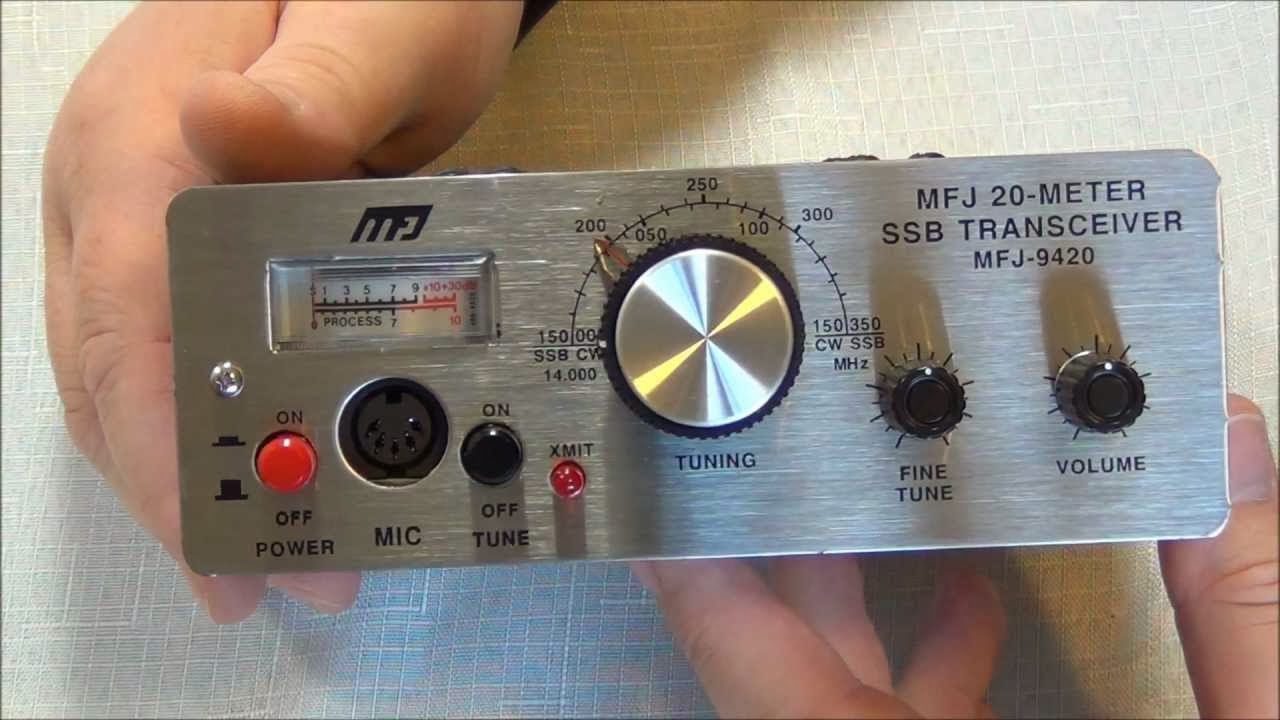
My next inspiration came 4-5 months ago when a local ham posted a Swap & Shop ad for a used MFG 9420 QRP radio. My first thought was maybe the 'Rolls Royce' KX3 was overshooting the mark and I should be looking at Honda's or Ford's instead?  I've only been a licensed Ham since early 2012 so maybe I should broaden my knowledge and do some more research.

MFJ-9420 - QRP Transceiver
That's when I started a more extensive search for QRP radios of all makes, models, and types. I fairly quickly narrowed down to the feature set that would be most practical for me.
  1. Multi-mode - SSB and CW. I don't know code yet, so SSB and Digital are the only modes I currently use. CW is something on my to-do list.
  2. Multi-band - Most or all of the HF bands would be the most useful to be.
  3. Rig Control - Even if it's a tiny netbook, laptop, or tablet. Logging, digital modes, and CAT control are tools I really enjoy having.
Well in QRP there is a lot of variety; from total kits, to assemble yourself, to ready built radios. There were single band radios and radios just for CW. When I applied my entire shopping list not a lot rose to top.

The Yaesu FT817 seems to be the main horse in the race. Priced at $750 CAD it's still pretty pricey for my budget but it covers the wish list very well. Nice 3rd party accessories also exist like autotuners, etc.


Yaesu FT-817 - QRP Transceiver

Somewhere along the way I stumbled onto blogs and webpages talking about the X1M from China. This was originally a kit radio and had an extremely active community of owners and builders. The price was half that of the FT-817 at $349 USD and the word on the web was a next generation (v3) model was due for release soon and it would be ready built and contain a shopping list of improvements over the original two versions. The new model was going to be called the X1M Platinum and it was due for import into North America in Nov/Dec 2013.

 Xiegu Technology X1M Platinum - QRP Transceiver

I started reading owners blogs and posts, and I joined the X1M owners Yahoo Group. I found the Yahoo Group to be incredibly active, with upwards of 30 posts and replies every single day. There were Elmers helping new owners, Engineers designing and sharing upgrades and modifications, and almost every conceivable Question and Answer that you could think of.

Eventually I settled on the X1M based on it's price, features, and the overall excitement from the community. I figure if your gonna stick your toe into the waters of QRP, you might as well know that others are already in the pool.

The timing was great since Christmas was just around the corner and with any luck I might be able to leverage some holiday gift money into a new purchase. I got so excited that this was gonna happen, I ordered the radio on the credit card 2-3 days before Christmas and crossed my fingers...


Thursday, December 26, 2013

A New Years Resolution Completed (just in time)

Ice Tube Clock Kit v1.1

In the fall of 2012 I ordered an electronics kit.

I heard about the kit from Leo Laporte of the TWiT network when he interviewed the sites founder Limor "Ladyada" Fried. She was a great guest and one of the kits they mentioned was a clock made from a retro Russian display tube! The site is Adafruit.com

Well it was earlier that same year that I become a licensed amateur radio operator and my interest in vacuum tubes and electronics was just beginning.

I had the best of intentions, this would be one of my winter projects. When I hadn't even taken the parts out of the box by Christmas it was suddenly one of my 2013 New Years resolutions that I would get it done by spring... NOT!

Well this morning (Dec 26th 2013) I woke with a grand ambition to do nothing. I have been at two family Christmas events in two days and now it was Boxing Day, also known around my house as Pajama Day! I wasn't gonna leave the house, I wasn't gonna exert myself, the only plans I had was for some TV and gaming, and relaxation. I started the morning with a couple relaxing cups of coffee, and I hopped online and spent all my Christmas gift money. Then I settled in for some video gaming until my buddy informed me that he was only gonna be available for an hour or so and then he was watching Hockey with his family for the rest of the day.

My wife and I watched a movie, and by 2:00 in the afternoon I was BORED. I went into the 'shack' and saw the old kit sitting on the shelf. I remembered New Years resolution, and I saw six days left on the calendar year. Suddenly, I did a quick inventory of tools and other required materials and I figured let's get at it. At best I might get it started and finish it sometime over the next week or so.
 
I took over the kitchen table and dragged a small tote full of tools upstairs. I had hoped the lighting at the table would be brighter, and the front windows might also let in some winter sunshine in.


The kit ended up being much smaller then I thought. And I mean smaller on ALL scales. The parts were smaller, the solder points were smaller, and the finished product was smaller. This meant I should have used a better light and a magnifying system of some kind, something I don't currently own.


Lucky for me I had one solder tip with a very very fine tip and I think it saved the day. The kit had no SMT parts, but it was a very tight board with very small thru-hole parts. The toughest might have been the 19 thin wires from the display tube threaded through tiny holes in a circle the size of a dime and spaced so tight together that the solder wanted to flow from one to the next. Squint, blink, breath, squint, blink, breath.


The instructions on the website were GREAT, lots of pictures, lots of warnings in places where other people frequently mess up. Having a tablet right in front of me with the step-by-step guide proved to be a handy tool.

Suddenly I lifted my head and 3+ hours had gone by. The kit was done and the clock was working perfectly. Wow that was fun, and obviously very focusing of my attention. I didn't get bored, I didn't get up and walk about, I was in a kit building trance.

Like I said, that was fun!

Now I have a cool new glowing clock on the desk in the Ham Shack. It's set to UTC, and it fit rights in.


Tuesday, November 26, 2013

The Old Is New Again - My 2nd Station


When I got into Amateur Radio a couple of years ago the first HF rig that I bought at a club auction was a Kenwood TS-120S. This old timer is still running fine, but it doesn't support the newer bells and whistles that I tend to find more useful in my radio experimentation. Next year the Kenwood will find a more permanent home in my 5th wheel trailer as a permanent mobile HF station.

The second radio I got was a Yaesu FT-847. This was a purchase that my dad helped me out with, and the key to the deal was one of my dad's friends and co-workers George VA7PRS/VA7COP who had the radio for sale.

The Yaesu was my "go to" rig for almost a year and it's all-band versatility and more modern features allowed me to experiment with a lot of different things in my first year as a licensed operator, VHF, UHF, HF, Auto Tuners, Rig Control, etc.

When I bought the Flex 5000a software defined radio the excitement of that led me away from the Yaesu for almost a year, once again the Flex was newer and cooler and there were things I needed to learn and expand my radio chops with.

At Field Day this year I spent a few hours chatting with Ron VA7VW who is heavily involved in Satellite and he opened up my interest in ISS, Amateur Radio Satellites, and the different uses for VHF and UHF that I hadn't even dabbled with yet. Ron helped the club earn a few extra points at Field Day by digipeating a message off the International Space Station. Needless to say I was impressed, it was all new to me.

So this long intro leads me back to the Yaesu FT-847 radio sitting on my bench doing little more then basic local VHF repeater work and net control operations for the last year.


[from the Yaesu website]


HF+VHF+UHF ALL MODE TRANSCEIVER
The FT-847 Earth Station: A masterpiece of high-tech design and packaging know-how!
Utilizing the latest computer-aided design techniques and thousand of "chip" components. Yaesu's engineers have achieved an engineering breakthrough that was only a dream just a few years ago: a full-power transceiver covering HF, 50 MHz, 144 MHz, and 430 MHz bands in a package about 2/3 the size of an average briefcase. Ready for action on SSB, CW, AM, FM, and digital modes, the FT-847's ultra-compact size makes it ideal for serious base stations use, and well as a variety of portable and mobile applications, including Field Day, DX-peditions, VHF/UHF "Rove" operation, and RV installations. And long-term reliability is ensured by the rugged construction, featuring an aluminum diecast chassis which doubles as the power amplifiers’ heat sink.


Unmatched for Satellite Operation
The FT-847 includes crossband full duplex operation, so you can hear your downlink signal while transmitting (on a different band) on the uplink. The FT-847 is ready for operating on Mode A (TX: 145 MHz, RX: 29 MHz), Mode B (TX: 435 MHz, RX: 145 MHz), Mode J (TX: 145 MHz, RX: 435 MHz), or Mode T (TX: 21 MHz, RX: 145 MHz).

Independent display of both the TX and RX frequencies is provided, and twelve dedicated Satellite VFOs allow you to set the transceiver up for operation on a number of different transponders.

Both "Normal" and "Inverted" tracking of the uplink and downlink VFOs is available.
Leading-Edge Receiver Design
Strong enough to survive the rigors of competitive HF operating, yet sensitive enough for stand-alone Moonbounce operation without an external preamplifier, the receiver section of the FT-847 includes a low noise preamplifier, followed by a quad-FET first mixer, which provides outstanding rejection of intermodulation.

On 430 MHz, the receiver preamplifier is a HEMT device, for extremely low noise. And if you have tower-mounted preamplifiers you wish to utilize, the FT-847 can be configured to bypass the internal preamp in favor of passing +12V through your coax line to power your preamplifier.
Built-in Digital Signal Processing (DSP)
For improved interference rejection, or enhancement of the signal-to-nise ratio, the FT-847 includes a sophisticated audio DSP system. Featuring Auto-Notch, Noise Reduction, and Bandpass Filter circuits, the DSP is an effective tool for improving receiver performance.

The Bandpass Filter is particularly effective in weak signal work, such as EME (Moonbounce), as the CW bandwidth may be reduced to a razor-sharp 25 Hz, with a variable center frequency. This can yield almost 10 dB of signal-to-noise improvement over many commonly-used audio filters.
Shuttle-Jog™ Quick Tuning Aid
First introduced on Yaesu's FT-1000MP transceiver, the Shuttle-Jog™ Tuning Ring provides rapid frequency change by its unique spring-loaded design. Rotating the Shuttle-Jog™ ring slightly to the left or right begins manual scanning to lower or higher frequencies, respectively; lean the ring further, and the scanning rate increases!
High-Contrast Multi-Function Blue Liquid Crystal Display (LCD)
The large blue LCD provides high resolution and contrast for easy viewing from a wide range of angles and light levels. Dozens of status indicators keep you informed of every aspect of your FT-847's operating characteristics, with a large Sub-VFO field on the right side being particularly helpful during satellite operation.

The LCD's illumination brightness is adjustable via an 8-level dimmer function.

The Yaesu has some serious chops in areas of Amateur Radio Satellite and Earth-Moon-Earth operation. I knew I needed to get it back up and running with more modes and versatility then just local VHF stuff. So another project began.

First, my laptop was getting old and starting to show signs of it's age. Rather then investing in a new one (not in the budget) I upgraded and added more memory (4GB) and switched to a used solid state drive I got from a friend (Intel 120GB SSD). These two changes really brought the old tech to life again. I also upgraded to Windows 7.

I wanted to build up a complete second station and this included a 2nd computer/laptop. My hope was that I could leave the first station with the Flex SDR alone and not confuse the setup by trying to get one computer to control both radios. I also hope that by going with a laptop I might be able to make the 2nd station portable sometime in the future for Field Day etc.

Next I ordered a Triplexer (Comet CFX514J - 1.3-90/130-200/380-500MHz) this allowed me to split the signals from my tower mounted JPole antenna (Arrow OSJ146/440) and feed both the VHF and UHF antenna ports in the back of the Yaesu radio and work crossband if required.

Next I experimented with a Signalink USB soundcard for the FT-847 and discovered I had a situation I needed to work around.  In a perfect world I want everything to be connected all the time, and be able to switch modes of operation without switching cables and plugs.

I have a LDG YT-847 auto tuner and it's just fantastic. The CAT/RS232 port on the back of the Yaesu wires into the YT-847 as part of the tuners requirement to control the radio for a few seconds during tuning. The YT-847 then has a pass thru CAT/RS232 port on the back of it to allow you to connect to a PC and still use radio control software like Ham Radio Deluxe. This double hop of CAT connections works just great and reliably.

Using the SignaLink soundcard for digital modes I didn't like having to plug and unplug the Mic every time I wanted to switch from voice to digital mode operation. I had to go this route because the CAT port on the back of the radio was already tied up with the auto tuner connections.

So I did some more research and ordered the RigBlaster Advantage soundcard because it has a Mic pass thru port that will allow the Mic to stay connected all the time as well as providing quick switching between voice and digital modes without cable swapping.

The RigBlaster also supports radio control and has a CAT/RS232 input on the back. The output of the RigBlaster to the PC is a single USB cable that carries the soundcard data and the CAT serial communication over the single wire connection. So with the previous solution I had a serial to USB converter cable running into the laptop for rig control, and I had another USB cable coming from the Signalink for audio. Now with the RigBlaster Advantage it will handle the digital modes function with the Mic pass thru admirably and all the CAT communication functions as well through a single USB cable solution into the laptop.


   Time to start playing and experimenting  :)


Friday, July 05, 2013

My First Amateur Radio Field Day

VA7AEJ (me, on the right) Saturday evening working 80m during Field Day 2013

If you follow my blog, (ha ha, I know that's such an incredibly optimistic opening comment) you'll know that I've only been a licensed Amateur Radio operator since Christmas of 2011. This means that the summer of 2012 and the summer of 2013 are the only two ARRL Field Day events that have come and gone during that period.

Last year my local club did nothing to celebrate Field Day. So, I sat at home that weekend and casually made a few contacts as a One Delta and got a bit of a feeling of what all the excitement was about. It was a busy weekend on the bands and I enjoyed listening to people work the pileups, as well as hearing more YL's, and more kids getting onto the radios and making contacts.

This year I'm on the Executive of the local club and as a new group of members overseeing club activities one of our focuses early on was to resurrect Field Day as a club activity. Overall our club is in a bit of a slump with membership, so we tried to identify activities that would be FUN for the existing members, and might ATTRACT old and new Hams in the area to rejoin the club.

Bob VE7EZI our club president took a great "Hell or High Water" approach to Field Day, he didn't care if only 5 or 6 of us took part, we were gonna make it happen. Good for you Bob!

Bob VE7EZI and Murray VE7MH found a great new location at a local pioneer tourist attraction North of Vernon called Historic O'Keefe Ranch. This was one of the larger working ranches in our area in the 1800's and now the entire site has turned into a tourist spot with historic buildings (main house, bunk houses, general store, church, saddle shop, ice house, museum building, etc.), tours, restaurant, farm animals, exotic animals, rodeo arena, camp ground, etc.

We found a nice large flat field area at the high part of the property. It was a bit secluded, but it gave us the space and freedom to do as we wished. It was home to 4 enormous old trees spaced about 150-200 feet apart in almost a square shape, and our wire antenna guys started to drool at the prospects that the trees offered.

As a club we had some new signs made to direct the public to our location. And we (very smartly) went to the site about 2 weeks before Field Day and setup our crank-up antenna tower trailer "Cranky" which has been in storage for a few years. This turned out to be an excellent idea as lots of tweaking was done and lots of bugs that might of appeared on Field Day were dealt with. Once onsite the management at O'Keefe let us leave "Cranky" there, so that reduced the amount of hauling around we would have to do on the actual Field Day weekend.
 
"Cranky" setup to the left of the screen with a 3 band Yagi on top working 20m most of the weekend.

 I was so excited about Field Day I personally booked off the Friday so I could pack the 5th wheel and get onsite early. This turned out to be a good idea becasue it took us a few hours on friday night to setup our operating area by eventually parking two 5th wheels side-by-side and lashing some tarps over both of them to provide a roof.

George VA7PRS brought the other RV and it was George and I who camped onsite all weekend and provided security. George also provided coffee and donuts all weekend long :)

Saturday morning the radios arrived and we were on the air and ready for the 11am PST start time for the contest.

During the day we operated Two Alpha so that left everyone time to visit, and play around with other radio stuff. We are so fortunate to have a heavy duty amateur radio satellite enthusiast within our midst and he was onsite to teach us about satellite contacts and with his help we digipeated a message off the International Space Station!!!


All in all a fantastic weekend. I was Net Controller for the club's Sunday Net that weekend so I operated from the site and enjoyed talking to other clubs and their Field Day operations through our Silver Star repeater (VE7RSS - 146.880).

Thanks to all the NORAC members who participated and lent a hand.
Thanks to all the visitors.

Most of all thanks to my daughter Molly who camped with me all weekend, helped me a lot, and was on the best of behaviour :)


Tuesday, May 07, 2013

Ham Shack Update - May 2013

Figured it was time to post an updated picture of the Ham Shack.

Lots of changes since the last posts, feeling a bit neglectful of the blog itself actually.

Changes include...


A 10" digital photo frame streaming all my eQSL cards, much easier then printing them and storing them in a photo album. It runs on a power on/power off schedule, so it's only going during hours when I might be in the shack or have visitors.


Completed my Ham Shack Solar Power System.
  • I started with a large professional panel on the roof 250W / 30A
  • A 30A solar controller in the shack
  • 2 large deep cycle 12v batteries
  • a 12V RigRunner power strip (to power all the radio gear)
  • A 1000W pure sine wave inverter (to power the PC, monitors, and audio mixer amp)
The system can run all the shack radio gear and computer off the hydro grid entirely. During a sunny day the input power from the panel exceeds the drain of all the radio gear running. In the evenings it can run for hours on the batteries alone before needing to recharge the next day. If I want to really stretch the solar power I can turn off the inverter and just power the core HF/VHF radio gear from 12V.


Built up a proper lightning arrestor system for the antenna's and gear. This includes 4 Alpha Delta lightning arrestors mounted to a copper bus bar in a steel enclosure outside at the shack on the wall. All the antenna feedlines (HF and VHF) route to individual arrestors in the enclosure, then patch cables route them into the shack and the radio gear. Large gauge copper ground cable runs from the bus bar to ground rods just a couple feet away. The project isn't finished with weather proofing to follow, but at least it's functional now to protect from lightning and static discharges. We've already head a early spring electrical storm and another if forecast for tonight.


VA7AEJ - RAC - OBS

VA7AEJ is now a Radio Amateurs of Canada - Official Bulletin Station.


Radio Amateurs of/du Canada
RAC Field Organization
 
Official RAC Field Organization Appointment Description
 
Official Bulletin Station (OBS)
 
            Rapid dissemination of information is the lifeblood of an active, progressive organization. The RAC Official Bulletin Station network provides a vital communications link for informing the amateur community of the latest developments in Amateur Radio and RAC. RAC bulletins, containing up-to-the-minute news and information of Amateur Radio, are issued by RAC Headquarters as soon as such news "breaks."
 
            To serve the greatest possible "audience," OBS appointees who can send RAC bulletins over VHF repeaters and via uploading to packet bulletin board systems (PBBS) are of maximum usefulness and much in demand.  If possible, an OBS who can copy bulletins directly from Internet (or the Bulletin Manager) should be assigned to each major repeater in the section. Bulletins should be transmitted regularly, perhaps in conjunction with a VHF repeater net, on a repeater "bulletin board" (tone-accessed recorded announcements for repeater club members), or via a RTTY or packet (computer) mailbox, if one is functioning locally.
 
Duties and requirements of the OBS include the following:
 
1. OBS candidates are required to have and maintain full RAC membership and hold a Basic or higher Amateur Operator’s Certificate of Qualification (or equivalent, as stipulated by the Radiocommunications Regulations).  They should always operate radio equipment only within the limits and privileges of the certificate and qualification held.
 
2. Retransmission of RAC bulletins must be made at least once per week to maintain appointment.
 
3. OBS candidates are appointed by the Section Manager (or by the Bulletin Manager, if the SM so delegates) and must adhere to a schedule that is mutually agreeable.
 
4. OBS appointees should send a monthly activity report (such as FSD-210 under "Schedules and Net Affiliations") to the Bulletin Manager, indicating bulletin transmissions made and generally updating the Bulletin Manager to any OBS-related activities. This reporting arrangement may be modified by the Bulletin Manager as he/she sees fit.
 
5. As directed by the Bulletin Manager, OBSs will include in their bulletin transmissions news of local, section and regional interest.
 
            Recruitment of new hams and RAC members is an integral part of the job of every appointee.  Appointees should take advantage of every opportunity to recruit a new ham or member to foster growth of Field Organization programs and our abilities to serve the public.